Features Labels Pricing Support About Contact
Home Features Jobs & Scheduling

Drag-and-Drop
Job Scheduling

A powerful visual calendar with glassmorphism-styled events, real-time multi-user awareness, drag-and-drop rescheduling, job templates, schedule clash detection, and full financial tracking — all without leaving the page.

4
Calendar Views
10
Job Edit Tabs
20s
Auto-Refresh Interval
Job Templates
Calendar Scheduler

Four Views. One Powerful Calendar.

Switch seamlessly between Day, Week, Fortnight, and Month views. Every event renders with signature glassmorphism styling — semi-transparent gradients, team avatars, and status indicators at a glance.

Day View

Time-grid from 5 AM to 9 PM with concurrent jobs as side-by-side blocks

Week View

7-day time-grid with narrower event blocks and full content display

Fortnight View

14-day day-grid with compact event pills for a broader overview

Month View

Full month day-grid with compact pills and click-to-zoom into any day

Glassmorphism Design

Beautiful, Functional Event Blocks

Every calendar event renders with semi-transparent gradient backgrounds, a coloured left accent border, team member avatars, and a status indicator. Hover for rich tooltips showing financials, team members, and clash warnings. Click for a full detail overlay — without ever leaving the calendar.

  • Drag and drop to reschedule — saves instantly via AJAX
  • Resize event edges to extend or shorten duration
  • Click any empty slot to create a new job, pre-filled
  • Real-time now indicator and 20-second auto-refresh
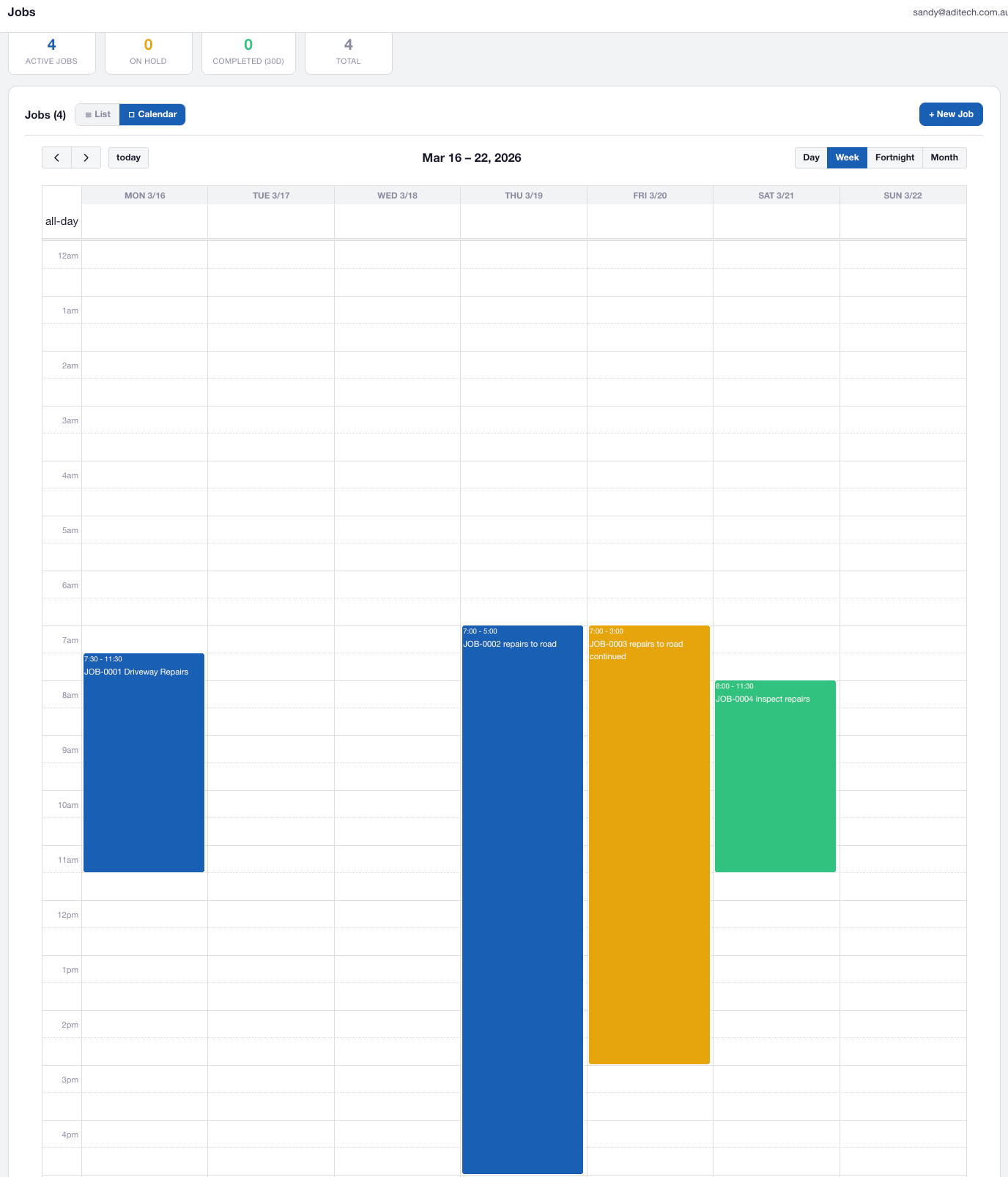
AXITRAQ Calendar with Glassmorphism Events
Job Detail Modal

Full Job Detail Without Leaving the Calendar

Click any event to open a rich glassmorphism overlay with five tabs: Details, Team, Materials, Documents, and Forms. Change the job status instantly from the inline dropdown. Edit or duplicate the job with one click. View spend vs budget with live progress bars.

  • Inline status dropdown saves changes immediately
  • Team card grid with avatars and profile links
  • Materials table with clickable item codes
  • Forms tab with submission counts and completion status
AXITRAQ Job Detail Modal
Real-Time Collaboration

See Who’s Viewing What, Live

When a user opens a job detail modal, a database lock is acquired with a heartbeat every 15 seconds. Other users see a red badge with the viewer’s initials on the event block, a red indicator in tooltips, and a warning banner if they open the same job. Locks auto-expire after 60 seconds.

  • Red initials badge on locked calendar events
  • 15-second heartbeat with 60-second auto-expiry
  • Immediate lock release on close via sendBeacon
AXITRAQ Multi-User Job Awareness
Job Types & Templates

Configure Once, Reuse Everywhere

Define job types with default colours, vendors, budgets, and assets. Create reusable templates that appear as draggable pills above the calendar — drag one onto any date to instantly create a fully-configured job with employees, assets, and forms pre-assigned.

  • Job types with default colour, vendor, budget, and assets
  • Drag-to-schedule templates with FullCalendar integration
  • Select a type when creating a job to auto-fill all defaults
  • Clash notification after drag-drop template creation
AXITRAQ Job Types and Templates
Clash Detection

Never Double-Book Again

Automatic detection when employees or assets are scheduled across overlapping jobs. Clashing events show a red border with a pulse animation on the calendar. The list view highlights rows in red. Pre-save validation warns you before committing.

  • Red border with pulse animation on clashing events
  • Tooltip breakdown showing which resources overlap
  • Pre-save confirmation dialog listing all clashes
  • Completed and cancelled jobs excluded from detection
AXITRAQ Schedule Clash Detection
Job Edit Page

Ten Tabs. Total Control.

Every job has a comprehensive edit page with ten dedicated tabs covering details, team assignments, materials, invoices, forms, photos, QR codes, and timesheets.

Details

Core fields, description, client, job type, dates, colour, budget, and vendor

Team

Employee and contractor assignments with purchase permission controls

Parts & Materials

Materials used on the job with unit costs and running totals

Documents

All uploaded documents linked to this job

Invoices

Invoice and credit note management with OCR upload and split-job visibility

Forms

Assign form templates to the job and track submission completion

Client Notes

Read-only journal entries from the linked client record

Photos

Universal photos captured from the field for this job

QR Codes

Timesheet QR for clock in/out and Document Display QR for site inspectors

Timesheets

All timesheet entries for this job with detail modal access

Job QR Codes

QR-Powered Timesheets & Document Access

Generate two types of QR codes per job. Timesheet QR lets employees scan with the AXITRAQ app to clock in and out with original timestamps preserved. Document Display QR creates PIN-protected pages for site inspectors to view documents without an AXITRAQ login.

  • Timesheet QR with full adjustment audit trail
  • 4–6 digit PIN protection for document QR codes
  • Print A4/A3 job site signs with QR codes
  • Rate-limited access with complete access logging
AXITRAQ Job QR Codes
Financial Tracking

Budget vs Spend, Always Visible

Spend is automatically calculated from invoice line items and submitted timesheets. Budgets display as live progress bars with colour-coded thresholds — green under 75%, amber up to 100%, red when over budget. Split invoices show only the relevant portion per job.

  • Auto-calculated spend from invoices and timesheets
  • Colour-coded budget thresholds in list and modal views
  • Split invoices across multiple jobs with per-job totals
  • Credit note handling and full deletion reversal
AXITRAQ Job Financial Tracking
Mobile & List View

Jobs on the Go. Jobs at a Glance.

The mobile app provides a full jobs calendar feed with date range filtering, job details, team lists, form submissions, and QR-based clock in/out. The web list view offers a sortable, filterable table with colour-coded spend thresholds, status badges, and one-click access to edit pages.

  • Mobile calendar feed with date range filtering
  • QR clock in/out from the AXITRAQ app
  • List view with job type and status filters
  • View persistence across sessions via localStorage
AXITRAQ Jobs List View

Ready to Schedule
Smarter?

Start your 30-day free trial and experience the most powerful job scheduling calendar your team has ever used.